01
Getting started
What 2way does for your business, how the app is organised and what the Dashboard tells you every morning.
What 2way is for
2way turns anonymous traffic, online and in your stores, into your own base of customers you can text. People leave their phone number in a pop-up, on a landing page, by scanning a QR/NFC sticker or by texting a keyword. They get a confirmation SMS, often with a discount code, and land in your contacts with a tag that says where they came from. From there you send campaigns, answer replies in chats and measure what each source and each message earns.
- 1Collect
Pop-ups, landing pages, embedded forms, QR & NFC, keywords.
- 2Reward
Confirmation SMS with a unique coupon; reminders sent automatically.
- 3Organise
Contacts tagged by source, store or campaign; blocklist kept for you.
- 4Send
SMS, MMS or WhatsApp campaigns to chosen tags, now or at a set time.
- 5Talk
Replies arrive in Chats, where your team answers them.
- 6Measure
Dashboard, Analytics and Reports: sign-ups, delivery, clicks, revenue.
Finding your way around
The menu on the left is grouped by what you want to do:
| Menu | What you do there |
|---|---|
| Dashboard | Daily summary of new subscribers, messaging and active campaigns. |
| Chats | One-to-one conversations with contacts (SMS, MMS, WhatsApp). |
| Contacts | Your customer base: search, import, tags, custom fields, blocklist. |
| GROW | Everything that brings new contacts: Sign-up forms, QR & NFC, Keywords, Coupons, Automations. |
| SEND | New campaign and the list of Campaigns with their progress and results. |
| LIBRARY | Reusable material: Media (images, videos), Templates, Shortened links. |
| Analytics | Overview of forms and QR/NFC performance; Reports you can download. |
| Connectors | Integrations and Webhooks that connect 2way with your systems. |
| Settings | General preferences, Phone numbers and sender names, Notifications. |
| Billing | Messaging balance, credits, plans and invoices. |
Some items appear only when your plan includes them (for example Sign-up forms, Coupons, Automations and Integrations come with pop-up plans, and NFC signs with the NFC option). If a menu item mentioned here is missing, contact your account manager.
Your profile menu
Click your name at the bottom of the menu to change the Language (English, Polski, Español), the Start page you see after logging in (Dashboard, Chats or Reports) and the Theme (Light, Dark or Auto). From here you can also collapse the menu and log out.
Dashboard: your morning check
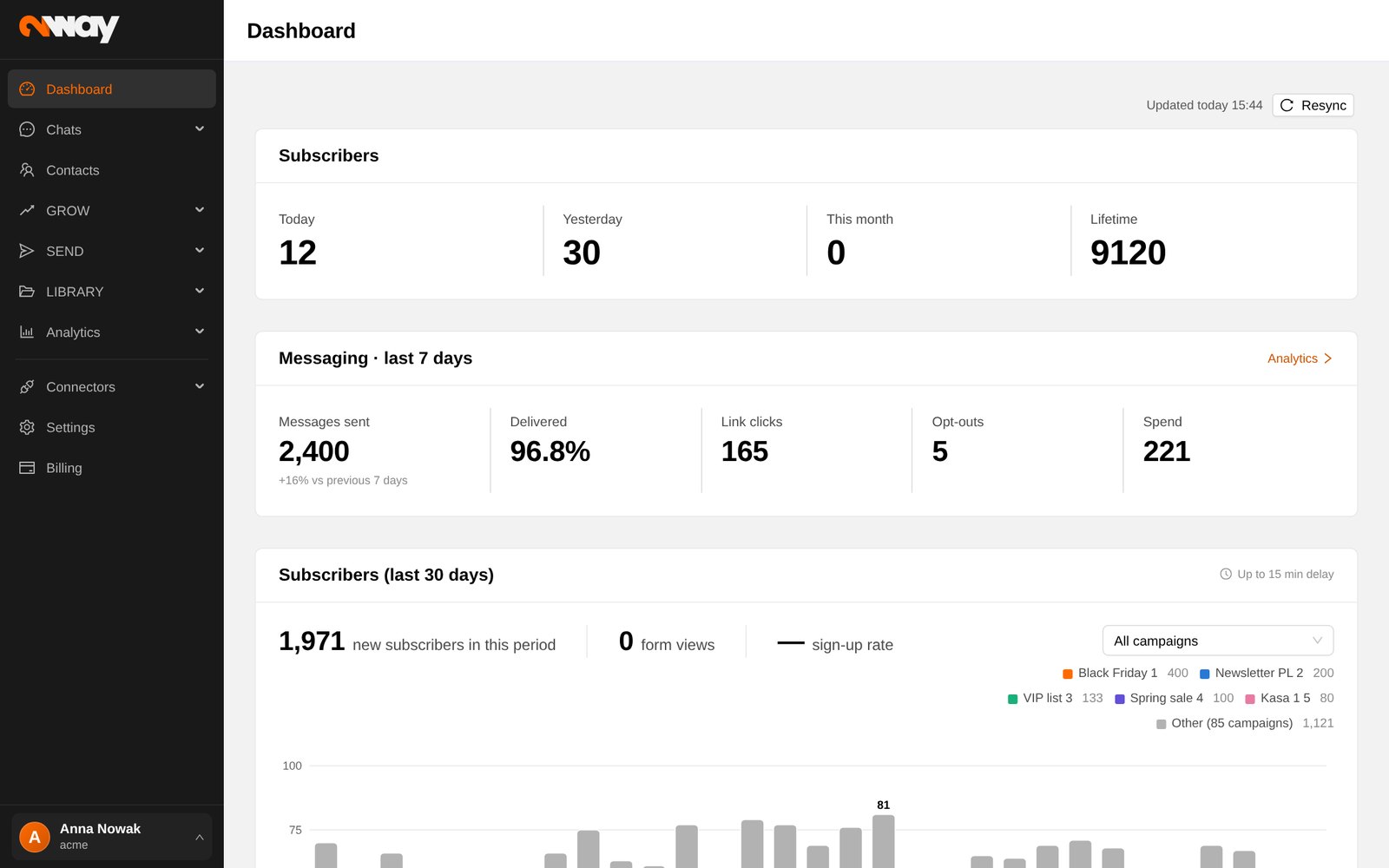
- Subscribers: new contacts today, yesterday, this month and since the start.
- Messaging · last 7 days: messages sent, delivered, link clicks, opt-outs and spend, each compared with the previous 7 days.
- Subscribers (last 30 days): the trend of sign-ups day by day.
- Active campaigns: pop-ups, landing pages, embedded forms and NFC with impressions, sign-ups, CTR, revenue and transactions. Filter by range, group or tag.